ScraperFlyAI-ready Web Data API

alternatives

Scrape.do Alternative for controlled scraping API workflows

Compare ScraperFly with Scrape.do when your team wants more than proxy-backed delivery: start with free credits, test real public pages, choose the lightest working request profile, and add rendering, sessions, headers, country targeting, stronger routing, or visual outputs only when the response proves they matter.

Scrape.do alternative

Choose evidence over blanket bypass settings

Scrape.do is usually considered by teams that want a proxy-backed web scraping API with anti-bot handling, JavaScript rendering, retries, and a success-oriented delivery model. That can be attractive when the main worry is getting through difficult public targets, but it is not the only buying question that matters.

ScraperFly is a better fit when your team wants to keep every request profile explainable. Start with a light public page capture, inspect the actual response, and then add rendering, waits, sessions, headers, country targeting, or stronger routing only when the target proves those controls improve the result. The goal is not to make every scrape heavier. The goal is to make the successful path clear before production volume grows.

response evidence controlled escalation format choice
Team comparing web scraping delivery evidence and response controls on a dashboard

What should a Scrape.do alternative solve?

A Scrape.do alternative should solve more than delivery. It should help the team understand why a request works, why it fails, and which output is actually useful after the page is captured. A successful status code is not enough if the final URL changed, the response is a challenge page, the HTML is an empty app shell, or the output still needs a custom converter before the product can use it.

ScraperFly keeps those decisions visible. A developer can compare source HTML with rendered output, request clean text or Markdown for content workflows, capture JSON metadata for debugging, and generate screenshots or PDFs when visual proof matters. That makes the page easier to evaluate as a production tool, not just as a delivery promise.

Practical takeaway: compare scraping APIs by the usable response they return, not only by whether a request eventually gets a 200 status.

Where is ScraperFly stronger for practical teams?

ScraperFly is strongest when the workflow needs a measured path from first test to production. Many scraping projects begin with uncertainty: the target may be static, JavaScript-heavy, region-sensitive, session-dependent, or occasionally blocked. A bypass-first setup can hide that uncertainty by turning on heavy controls early. That may work, but it can also make costs, debugging, and failure recovery harder to explain.

With ScraperFly, the team can keep the first request simple, then expand the request profile only when evidence supports it. This is especially useful for teams that need to justify credit usage, compare response formats, or hand a canonical request to backend code, Postman, cURL, Python, Node.js, an agent, or a monitoring job.

Decision point ScraperFly advantage Why it matters
First target test Start with a light request and inspect the real response. The team can prove whether the page needs rendering, routing, headers, or sessions before spending more.
JavaScript pages Enable browser rendering when source HTML misses useful content. Rendering becomes a precise capture option rather than a blanket default for every URL.
Response shape Return HTML, text, Markdown, JSON metadata, screenshots, or PDFs. The downstream product receives the format it can use immediately instead of building converters too early.
Harder targets Add waits, sessions, headers, country targeting, or stronger routing when response evidence supports it. Escalation stays connected to observed target behavior, which keeps recovery and cost control clearer.
Buying path Use free credits, pay-as-you-go packs, or monthly credits as the workload becomes clearer. One-off tests and uneven projects do not need to become oversized subscriptions on day one.

When can Scrape.do still be a reasonable fit?

Scrape.do can be a reasonable fit for teams that specifically want an anti-bot and proxy-forwarding product as the center of the workflow. If the buying decision is primarily about delivery through difficult targets, proxy mode, retries, and a success-oriented request model, it belongs on the shortlist. The right choice depends on how much control the team needs around output formats, request weight, diagnostics, and integration shape.

ScraperFly should win when the buyer wants a broader public page capture workflow: easy first tests, visible request controls, output formats for different consumers, visual evidence when needed, and a path from lightweight HTML to heavier browser or routing profiles without hiding the trade-offs.

How should teams compare success-based scraping claims?

Success should be measured at the artifact level. A request is only useful when the returned response can feed the parser, archive, monitor, QA process, AI pipeline, or backend job that asked for it. That means the team should inspect more than status codes. Check the final URL, response size, content type, source HTML, rendered HTML, redirect chain, timeout behavior, visual output, and whether the page returned useful content or a challenge screen.

This is where ScraperFly’s controlled workflow helps. The same target can be tested as a light HTML request, then with rendering, then with stronger routing or session context only when needed. Each step gives the team a reason to continue, stop, or change the request profile.

Signal What to inspect Better next action
Empty or thin HTML Source markup, rendered markup, response size, visible content. Try rendering before assuming the target needs stronger routing.
403, 429, or challenge page Status, body text, final URL, frequency across samples. Review headers, pacing, sessions, country context, or premium routing based on evidence.
Unexpected redirect Final URL, country behavior, consent flow, login wall, locale. Adjust target expectations before scaling the same profile.
Useful content but wrong format Consumer needs: parser, AI workflow, visual QA, archive, monitoring. Choose HTML, text, Markdown, JSON metadata, screenshot, or PDF around the downstream job.

How can ScraperFly lower cost without weakening capture?

The cheapest request is not always the best request, and the heaviest request is not automatically the safest. Cost control comes from matching request weight to the target. Simple public pages can stay on lightweight capture. JavaScript pages can use rendering when the useful data appears after browser execution. Visual proof can be reserved for pages that require screenshots or PDFs. Premium routing can be used for targets where standard delivery does not return a usable response.

That makes ScraperFly a practical alternative for teams that want to test before committing. Use the API Builder to compare profiles, review JavaScript rendering when the page is browser-built, check custom headers when request context matters, and use pricing to keep request weight aligned with the workload.

Practical takeaway: the strongest alternative is the API that helps your team choose the smallest reliable request profile and still return the output your product needs.


Scrape.do alternative

Choose ScraperFly when the scraping API needs proof, control, and flexible output

Scrape.do is often considered for proxy-backed delivery and anti-bot handling. ScraperFly is a practical alternative when teams want a free start, flexible credits, visible request controls, rendering, sessions, headers, routing options, screenshots, PDFs, and response formats that move directly into product workflows.

Happy team validating a project on a laptop
01 / Start easy

Easy, free start before any billing pressure

ScraperFly gives you room to test the real target first. Use free credits to check whether the page works, whether the data is present, and which controls are actually needed before you commit money to a plan. That makes the first experiment feel light: no procurement loop, no forced subscription, no guessing your monthly volume on day one.

Free creditsNo card for first testsValidate before scaling
Smiling professional working successfully with a laptop
02 / Spend smart

Affordable, flexible billing for real-world scraping volume

Not every scraping workload is a neat monthly curve. Some projects spike, some pause, and some only become recurring after the data proves value. ScraperFly supports that reality with a pay-as-you-go path plus monthly credit plans when steady volume makes sense. You can buy what you need, keep costs visible, and avoid turning a small test into an oversized subscription.

Pay as you goMonthly when usefulCost control
Developer preparing structured output from a laptop
03 / Ship faster

Response preprocessing that removes cleanup work

A cheap fetch is not enough if your team still has to build converters, cleaners, screenshots, PDF capture, and LLM-ready formatting around it. ScraperFly can return the response as HTML, clean text, Markdown, structured JSON, PDF, or image output, so your pipeline gets closer to the final asset in one request. Less glue code, fewer moving parts, faster delivery.

HTMLTextMarkdownJSONPDFImage

ScraperFly vs Scrape.do for production scraping teams

The useful comparison is workflow fit: how quickly the team can validate real targets, choose the lightest reliable profile, return a usable response, and understand what changed when a request fails.

Decision pointScraperFly advantageTypical competitor tradeoff
First experimentStart with free credits and validate the real target before spending. You can prove whether raw HTML, rendering, premium routing, or country targeting is actually needed.Trials often push you quickly toward a recurring plan or hide the true cost until add-ons enter the request.
Billing modelUse pay-as-you-go credits for uneven work, then move to monthly credits only when the workload becomes predictable. This keeps small tests and project-based scraping affordable.Many tools are optimized around monthly subscriptions, fixed allowances, or tier gates that can feel heavy before volume is proven.
Request weightKeep simple pages simple. Turn on JavaScript rendering, premium routing, sessions, headers, waits, or country routing only when the response evidence says they matter.Comparable controls may exist, but they are often bundled into higher tiers, defaults, or more complex pricing profiles.
Output formatsReturn the response in the shape your product needs: HTML for parsers, text or Markdown for content pipelines, JSON for structured metadata, and PDF/image output for visual proof.Some providers focus mainly on access and leave formatting, capture, cleanup, and downstream preparation to your own code.
Developer workflowOne API surface can cover target testing, escalation, rendering, routing, sessions, headers, response formatting, and status checks. The path from prototype to production stays compact.Proxy-first tools, actor marketplaces, and crawler platforms can be powerful, but often require more glue code or a heavier operating model.
Best fitTeams that want practical web data delivery: start small, measure cost per useful result, and scale only the controls that improve the outcome.Teams with fixed high-volume contracts, custom proxy infrastructure, or broad marketplace crawler needs may prefer a more specialized platform.

Delivery evidence

Escalate from simple capture only when the target proves it is needed

ScraperFly gives teams a cleaner path than turning every request into the heaviest profile. Start with a simple public page capture, inspect status, response size, final URL, and body quality, then add rendering, waits, sessions, headers, country context, or premium routing when the evidence shows those controls improve the result.

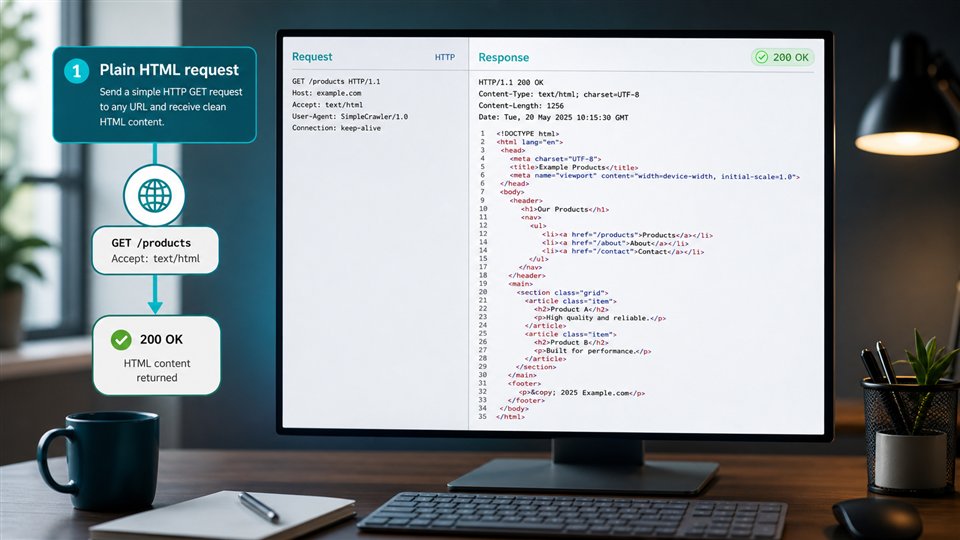
A simple HTTP request returning a clean HTML response
01

Plain HTML request

Use this first for public pages that already include the required data in the initial HTML.

A page changing from an empty HTML shell to a rendered DOM after JavaScript runs
02

JavaScript rendering

Enable rendering when the server returns a shell, but the useful page content appears only after JavaScript executes.

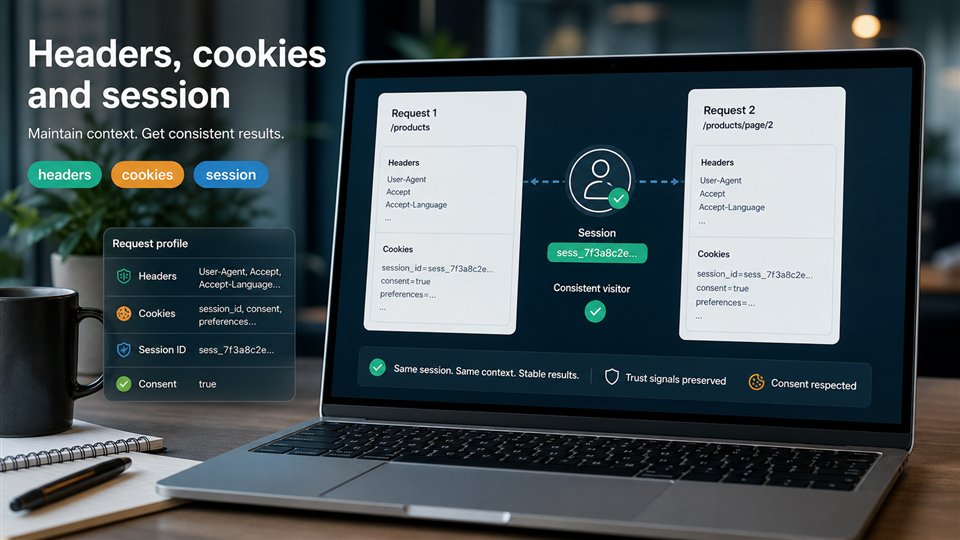
Headers, cookies and session state preserved across two requests
03

Headers, cookies & sessions

Use visitor-state controls when the target expects continuity between requests or returns different content after consent, locale, or navigation state is set.

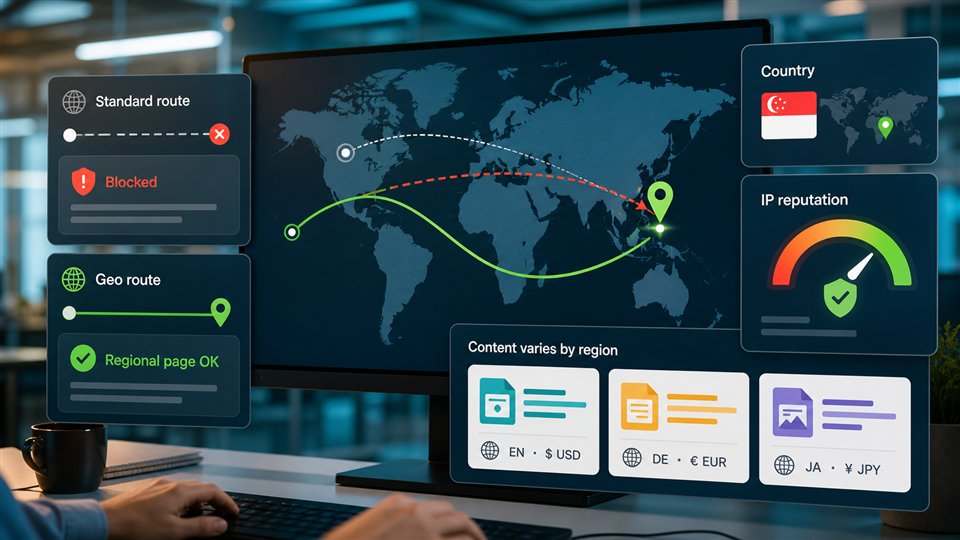
A request routed through a selected country and higher reputation proxy path
04

Premium proxy & geo

Escalate routing when the response depends on request origin, IP reputation, or target geography.

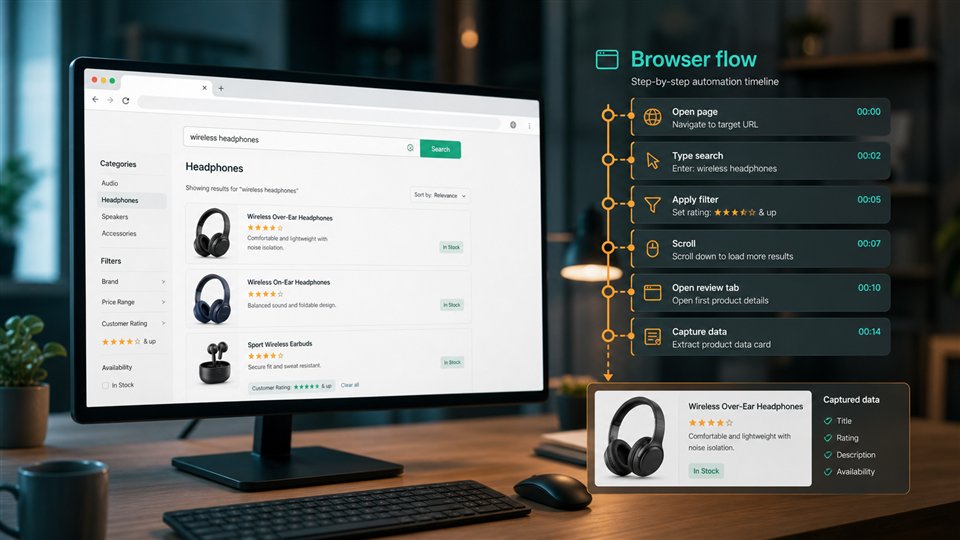
A browser automation flow with search, filters, scrolling and data capture steps
05

Browser flow

Use a full browser flow when the data is behind interaction rather than a single request: search boxes, filters, scrolling, tabs, or multi-step navigation.

Escalate when:

01

Plain HTML request

the raw response contains the fields you need, status codes are stable, and page size/content do not collapse after repeated checks.

  • Product details, article text, documentation, or listings are visible in the HTML response.
  • The final URL, status, and content length stay consistent across a small sample.
  • No consent wall, visitor state, or client-side API call is required for the target fields.
02

JavaScript rendering

the raw HTML is mostly placeholders, the rendered DOM contains the target fields, or key data arrives through client-side requests.

  • Raw HTML has app containers, loading skeletons, or empty product grids.
  • Browser inspection shows the fields after scripts finish.
  • Screenshots look correct while the HTML response alone is incomplete.
03

Headers, cookies & sessions

pagination, reviews, filters, or consent flows depend on the same visitor context across multiple requests.

  • The first request sets cookies that change later responses.
  • Locale, consent, currency, cart, or filter state must be preserved.
  • The page redirects or empties out when requests look stateless.
04

Premium proxy & geo

the same URL behaves differently by region, returns 403/429 from one route, or shows location-specific pricing, availability, SERP, ads, or catalog data.

  • Datacenter-like traffic receives blocks while a higher-reputation route works.
  • Country, language, currency, inventory, or search results change by geo.
  • Repeated requests trigger rate limits or challenge pages on specific routes.
05

Browser flow

the target data appears only after user-like navigation steps, or protected areas such as reviews, profiles, search result refinements, or special data panels behave differently from simple detail pages.

  • A click, scroll, search, or filter action is required before the fields appear.
  • Reviews, profiles, or dynamic result pages load in separate steps.
  • Simpler fetch/render attempts return partial content, challenge pages, or unstable states.

Stay lower & Credit impact:

01

Plain HTML request

Stay lower: the page already returns complete data. Adding rendering or premium routing here only adds latency and credit usage without improving the result.

Credit impact: lowest request profile because it avoids browser work and special routing.

02

JavaScript rendering

Stay lower: the fields are already present in raw HTML. A modern-looking site does not automatically mean JavaScript rendering is needed.

Credit impact: higher than plain HTML because browser work, wait time, and page resources are involved.

03

Headers, cookies & sessions

Stay lower: public content is stable without state. Do not invent sessions for pages that can be fetched cleanly as anonymous HTML.

Credit impact: usually moderate; the bigger cost is operational complexity and retry discipline.

04

Premium proxy & geo

Stay lower: the target is globally consistent and accepts normal routing. Premium and geo routing should be tied to evidence, not used as a default blanket setting.

Credit impact: can increase credit usage and latency, so apply it to the URL groups that actually need it.

05

Browser flow

Stay lower: a single HTML or rendered request already returns the target. Browser flows are the strongest tool in this ladder, not the default starting point.

Credit impact: highest request profile because it combines browser runtime, waits, navigation, and often heavier routing.

Escalate by evidence, not by habit

  • For most public websites, a plain HTML request or light JavaScript rendering is enough. Start there, inspect the response, and only then decide whether the next step is justified.
  • Anti-bot signals are usually visible in the response: unexpected 403 or 429 statuses, sudden redirects, tiny or empty HTML, challenge pages, CAPTCHA screens, login or consent loops, and content that disappears after repeated requests.
  • Large high-traffic targets such as Amazon, Google, LinkedIn, Instagram, TikTok, and major marketplaces often protect some surfaces aggressively. They may require rendering, sessions, careful routing, or a browser flow, and each target needs its own test profile.
  • Protection is not uniform even inside one site. Product/detail pages may open with a lighter profile, while reviews, profiles, search pages, price-sensitive views, availability panels, or account-adjacent data can require stronger escalation.
  • Geo and premium proxy settings affect both what you receive and how expensive the request profile becomes. Use them when country-specific content, IP reputation, or repeated blocks prove they matter.
  • The practical goal is not to turn on every ScraperFly control. The goal is to find the sufficient level that returns complete, repeatable data while keeping credit usage, latency, and failure modes under control.

Target fit

Read the target response before choosing the delivery profile

A fair Scrape.do alternative comparison needs real response evidence: final URL, status, content type, response size, source HTML quality, rendered state, redirects, and whether stronger routing changes the result. ScraperFly keeps those signals close to the request so the team can choose controls with confidence.

Raw HTML response mapped to visible page data
01

Raw HTML availability

Check whether the fields you need are already present in the first HTML response.

Best first test for simple pages, articles, docs, listings, and product details.

Before and after JavaScript rendering comparison
02

JavaScript dependency

Compare raw HTML with the rendered DOM or screenshot before turning on browser rendering.

Use rendering when raw HTML is only a shell and scripts create the useful content.

Cookies, consent, session and access context for scraping
03

State & access context

Identify whether cookies, consent, login boundaries, pagination, or the same visitor state affect the response.

Use sessions and headers when continuity changes the data you receive.

Regional content variations across countries and routes
04

Geo/content variation

Test whether country, language, currency, inventory, SERP, ads, or route reputation changes the result.

Use geo or premium routing only when the target proves the response varies by route.

Checks before choosing a Scrape.do alternative

Where is the target field?

Find whether the field exists in raw HTML, rendered DOM, an API call, structured data, a file, or a later interaction state.

What changes the response?

Sample a few URLs and compare status, final URL, content length, redirects, empty states, and visible result differences.

What context is required?

Mark any dependency on consent, locale, cookies, headers, authentication boundary, pagination, filters, or previous requests.

What does failure look like?

Define the signals for blocked, partial, stale, redirected, empty, timed-out, or region-mismatched responses before scaling.

How target evidence shapes ScraperFly setup

Fetch mode

Raw HTML availability decides whether the first request can stay simple or needs rendering, waits, screenshots, or extraction.

Request context

State requirements decide whether to add headers, cookies, sessions, consent handling, or a stable visitor profile.

Routing choice

Geo and reputation findings decide whether standard routing is enough or a country/premium route is justified.

Validation rules

Known failure states become checks for retries, escalation, QA review, and deciding when a lighter profile is still complete.

Request builder

Build a ScraperFly request that is easy to inspect, copy, and ship

Choose target URL, response format, rendering, routing, sessions, headers, country targeting, screenshots, or PDFs in one API workflow before moving the request into production.

HTML
Raw response

Raw HTML for parsers and crawlers

Use the fastest path for static pages, listings, docs, and product pages. Fetch the original source HTML first, then switch on browser rendering when JavaScript creates the markup your scraper needs.

format=htmlrender=falserender=true
TXT
Clean data

Text, Markdown, and JSON

Skip the cleanup layer after page access. Return readable text for agents, Markdown for prompts and RAG, or structured JSON with metadata, links, headings, clean text, and Markdown ready for your pipeline.

format=textformat=markdownformat=json
PDF
Visual files

Screenshots and PDFs

Capture what a real browser sees when you need QA evidence, archived proof, visual regression checks, downloadable reports, or shareable page records for customers and internal teams.

format=screenshotformat=pdfdownload

Controls that matter when comparing Scrape.do alternatives

url

The public page being captured.

format

The response shape for parsing, review, AI, or proof.

render

Browser execution for JavaScript-built content.

premium

Stronger routing for sources where basic delivery is not enough.

cURL example

Generate Markdown with the same request shape you can move into production

curl "https://scraperfly.com/api/v1?url=https%3A%2F%2Fexample.com&format=markdown" \
  -H "apikey: YOUR_API_KEY"

Cost control

Keep request weight aligned with the work the target actually needs

ScraperFly keeps testing and early projects practical: free credits for first validation, pay-as-you-go packs for uneven jobs, and monthly credits when recurring scraping volume becomes predictable. The best request is the smallest reliable profile that returns the output your product can use.

A lightweight HTML request returning a simple response
01

Basic fetch

Use a basic fetch when public HTML already contains the fields you need.

Lightest request profile; keep it when the response is complete.

JavaScript rendering producing a complete DOM
02

Rendering

Use rendering when raw HTML is a shell and JavaScript completes the page.

Heavier profile; use it only when browser output changes the result.

Several requests preserving cookies and visitor state
03

Stateful session

Use sessions when cookies, consent, locale, or pagination change the response.

Heavier state profile; preserve it only when continuity matters.

Request routing through geo and higher quality routes
04

Premium routing & geo

Use premium routing or geo only when origin, country, reputation, or regional content changes the result.

Heaviest routing profile; apply it only to targets that prove they need it.

What makes a request heavier

More infrastructure work

Browser rendering, routing choices, and longer waits mean the platform has to do more than return a simple response.

More target uncertainty

Redirects, empty states, rate limits, and challenge pages often require stronger delivery options or retries.

More state to preserve

Cookies, sessions, consent, and multi-page flows add moving parts that a plain stateless fetch does not have.

More evidence to return

Screenshots, PDFs, rendered output, and richer response artifacts are useful, but they are heavier than plain HTML.

How to keep request weight predictable

Sample before scale

Test a small URL set first and group targets by the lightest profile that returns complete data.

Do not render by default

Inspect raw HTML before turning on rendering. Many public pages already contain the data you need.

Escalate by evidence

Move up only when the response shows missing content, state dependency, geo variance, or routing problems.

Measure useful results

Optimize around valid records delivered, not raw request volume. A lighter profile is best only when it stays complete.

Buyer questions

Common questions before choosing a Scrape.do alternative

Practical answers for teams comparing proxy-backed delivery, JavaScript rendering, response formats, failure recovery, and flexible credit-based usage.

Quick answers

Choosing the right API

Use ScraperFly when the buying decision depends on request evidence, output shape, and cost control.

When is ScraperFly a good Scrape.do alternative?

When your team wants controlled public page capture with rendering, routing, sessions, headers, multiple response formats, visual proof, and flexible credits in one workflow.

Should I compare only successful status codes?

No. Compare final URL, response size, content type, source HTML, rendered output, challenge pages, and whether the returned artifact is usable downstream.

Rendering and routing

Add heavier controls when target evidence shows they improve the response.

Can ScraperFly render JavaScript pages?

Yes. Use rendering when source HTML does not contain the useful content and the browser-built state changes the result.

Can ScraperFly use stronger routing?

Yes. Stronger routing belongs after evidence shows standard delivery is not returning a usable public page response.

Formats for real workflows

Choose the response shape around the system that will consume it.

Which outputs can ScraperFly return?

ScraperFly can return HTML, text, Markdown, JSON metadata, screenshots, and PDFs depending on the request profile.

Are screenshots and PDFs parser inputs?

Usually not. They are best for QA, monitoring, approvals, and archive proof, while HTML, text, Markdown, and metadata are better for machine workflows.

Lower-risk buying path

Start small, prove the target, and scale once the workload is clearer.

Does ScraperFly support pay-as-you-go usage?

Yes. Teams can start with free credits, buy pay-as-you-go credit packs for uneven projects, and move to monthly credits when demand becomes predictable.

How do teams keep request costs clear?

Keep simple targets light, add rendering or routing only when needed, and reserve visual files for workflows that require proof.