ScraperAPI alternative
Move from proxy fetches to usable response workflows
ScraperAPI is a familiar choice for teams that want a simple scraping endpoint backed by proxies, rendering options, geotargeting, and anti-bot handling. It is often evaluated when the first problem sounds direct: send a URL and get the page back.
ScraperFly is the stronger fit when the buying decision is broader than delivery. Your team can test a real public target, inspect source and rendered output, choose HTML, text, Markdown, JSON metadata, screenshots, or PDFs, and add sessions, headers, country targeting, waits, or stronger routing only when the response proves those controls improve the result. That makes the workflow easier to debug, easier to price, and easier to move into production.

What should a ScraperAPI alternative solve?
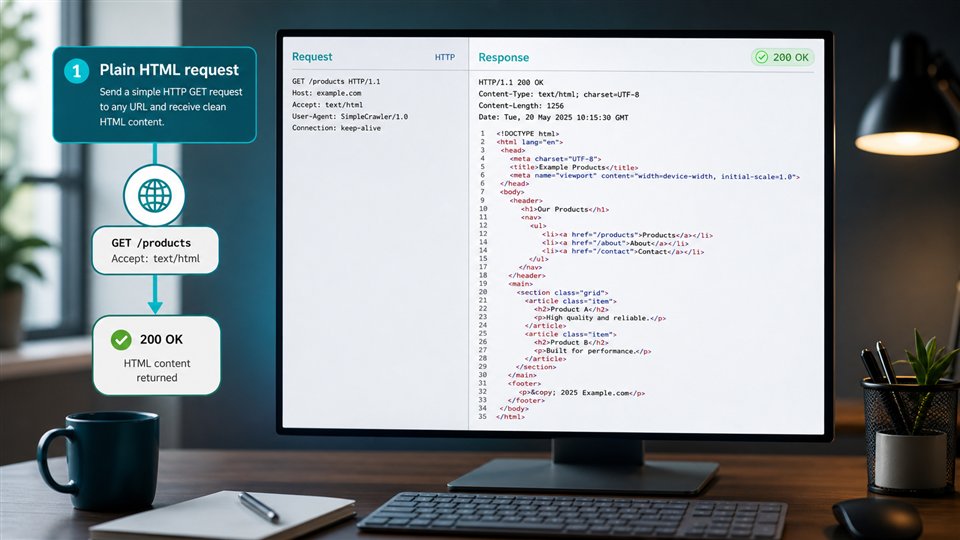
A ScraperAPI alternative should solve the full production path around public page capture. Getting a response is only the first step. The team also needs to know whether the response is source HTML, rendered HTML, a challenge page, a redirect, a thin app shell, a useful text document, or a visual artifact that can be reviewed later.
ScraperFly keeps that evidence visible. A developer can start with a lightweight request, compare the body and metadata, then choose the output that fits the consumer: HTML for parsers, text or Markdown for content systems, JSON metadata for logs and routing decisions, screenshots for visual QA, and PDFs for archive workflows. This is a practical difference for teams that do not want to build converters, browser workers, and delivery heuristics before they know which targets actually need them.
Practical takeaway: choose the API that returns a usable artifact for your product, not only the API that promises to fetch a URL.
Where is ScraperFly stronger than a basic proxy-backed endpoint?
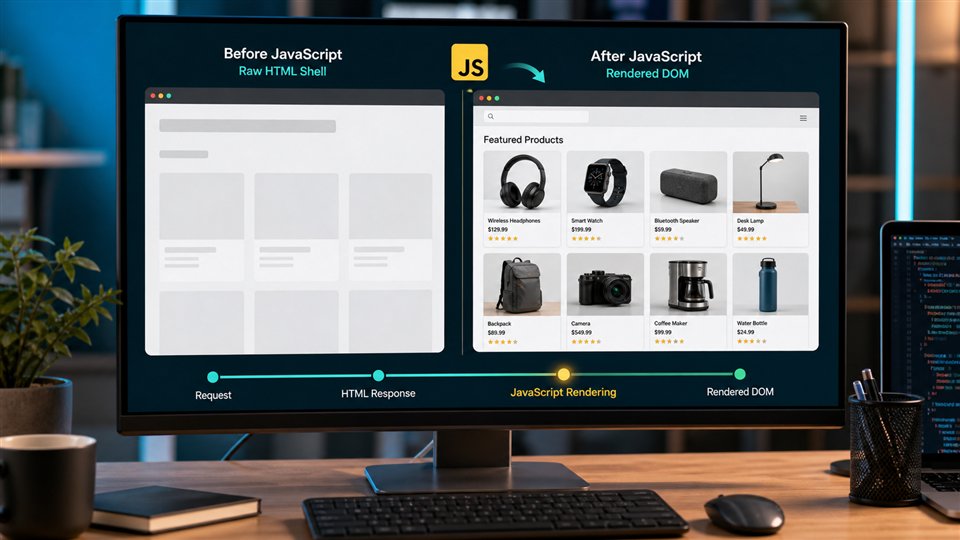
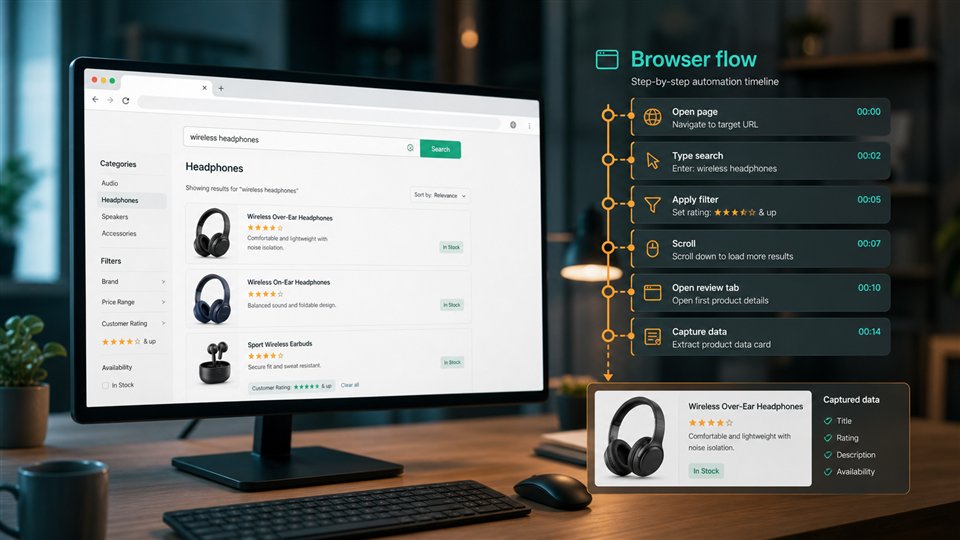
ScraperFly is stronger when the team wants request design to stay deliberate. A simple public page can remain a light HTML capture. A JavaScript-built page can use rendering when source HTML is incomplete. A page that changes by language, location, session state, or headers can add those controls after a sample proves the difference. A monitoring or compliance workflow can request visual proof only for pages that need it.
That measured approach matters because scraping costs and failure modes often come from turning on heavy controls too early. Rendering, premium routing, waits, sessions, and visual files are powerful tools, but they should be connected to the target behavior. ScraperFly makes the choice inspectable instead of treating every URL as the same kind of request.
| Evaluation point | ScraperFly path | Why it helps |
|---|---|---|
| First target validation | Start with a light request and inspect response evidence. | The team can prove target behavior before committing to heavier settings. |
| JavaScript content | Enable rendering when browser execution changes the useful output. | Rendering becomes precise, not a default tax on every scrape. |
| Downstream format | Choose HTML, text, Markdown, metadata, screenshot, or PDF. | The next system gets the response shape it can use immediately. |
| State and request context | Add sessions, cookies, headers, or country targeting when samples show they matter. | Request context stays tied to real target differences. |
| Cost control | Use free credits, pay-as-you-go packs, or monthly credits as demand becomes clear. | Early experiments and uneven projects do not need to become oversized subscriptions. |
When can ScraperAPI still make sense?
ScraperAPI can make sense when a team wants a well-known scraping API focused on proxy-backed retrieval, rendering options, geotargeting, and anti-bot handling. If the target list is already understood, the output needs are simple, and the team mainly wants a familiar URL-in response-out service, it belongs in the comparison.
ScraperFly becomes more attractive when the workflow needs clearer request evidence and more flexible output. If your team needs to compare raw and rendered capture, choose Markdown for AI workflows, preserve screenshots or PDFs, test request profiles in an API Builder, and keep credit usage tied to actual target difficulty, ScraperFly offers a cleaner production path.
How should teams compare rendering and premium delivery?
Rendering and premium delivery should be compared with representative pages, not assumptions. Some pages look difficult but return complete useful HTML in the first response. Other pages return an app shell that only becomes meaningful after JavaScript runs. Some pages need realistic headers, stable session state, country context, or stronger routing before they return a useful public response.
The best comparison is step-by-step: test source capture, review status and response size, compare rendered output, inspect final URL, and then decide whether stronger delivery improves the artifact. ScraperFly supports that sequence directly, which helps teams avoid paying for every advanced control on pages that do not need them.
| Signal | What it means | ScraperFly next step |
|---|---|---|
| Complete source HTML | The useful content is already in the initial response. | Keep the request light and return HTML, text, or Markdown as needed. |
| Thin app shell | The page likely needs browser execution before capture. | Enable rendering and compare rendered HTML or visual output. |
| Regional or language mismatch | The public response changes based on location or request context. | Test country targeting, language headers, or session continuity. |
| Challenge, block, or repeated delivery failure | The default profile is not returning a usable public page. | Review pacing, headers, routing, and escalation before scaling retries. |
| Need for human proof | The workflow needs to show how the page appeared. | Generate screenshots or PDFs for selected captures instead of every request. |
How does ScraperFly support developer adoption?
A scraping API is easier to adopt when the first working request can move directly into code. ScraperFly keeps the request profile explicit: URL, format, rendering, waits, sessions, headers, country targeting, routing, and file output. Developers can test the same public target in the API Builder, then copy the request shape into cURL, Postman, Python, Node.js, backend workers, agents, or monitoring jobs.
This is useful for teams comparing ScraperAPI alternatives because it shifts evaluation from a feature checklist to a working request. Review response formats when the main question is output shape, use the JavaScript rendering API guidance when source HTML is incomplete, compare custom headers when request context changes the result, and check pricing once the request profile is proven.
Practical takeaway: a stronger ScraperAPI alternative helps the team build the right request, return the right format, and scale only the controls that the target actually needs.