Listing evidence
Capture public property listings before prices, photos, and availability change
Real estate listing pages are not static records. A listing can change price, status, photos, description, amenities, map placement, agent details, and availability language between captures. Search pages add another layer: pagination, filters, map bounds, sort order, location context, and stale or duplicate listings can all change what the page returns.
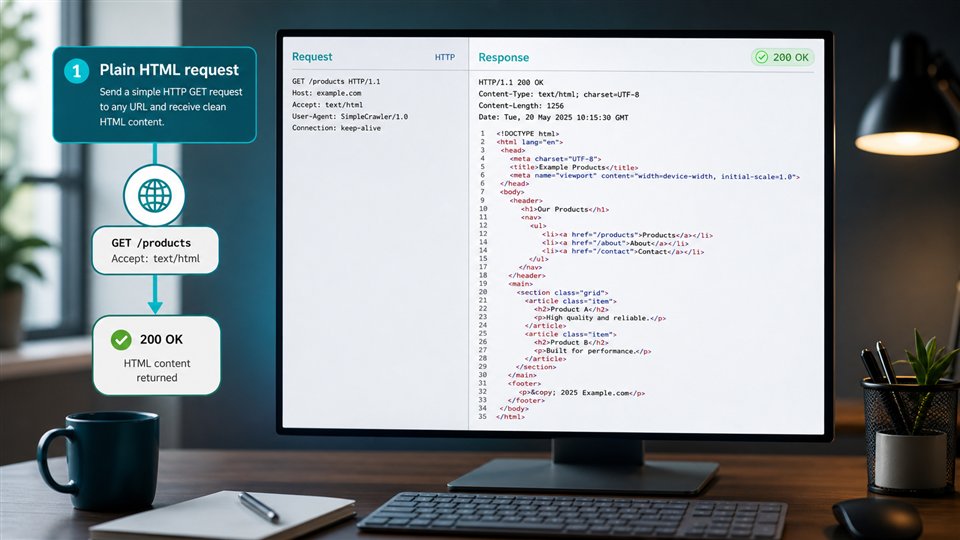
ScraperFly gives real estate data teams a practical capture layer for public listing evidence. Start with sample search and detail pages, inspect the response, choose HTML, rendered HTML, text, Markdown, metadata, screenshot, or PDF output, then let your own workflow extract fields, compare changes, deduplicate records, and decide what matters.

What is a real estate listing scraping API?
A real estate listing scraping API captures public property listing pages so an application can inspect, parse, monitor, compare, or archive listing evidence. The captured page may be a search results page, a listing detail page, a broker page, a neighborhood page, or a public portal page. The useful output can be HTML for extraction, rendered HTML for JavaScript-built listings, text or Markdown for review, metadata for diagnostics, or screenshots and PDFs for visual proof.
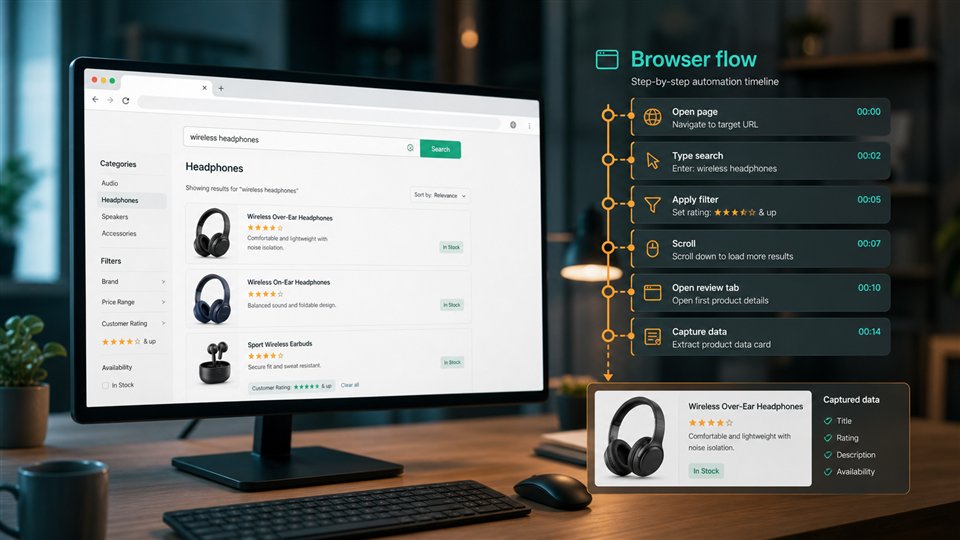
ScraperFly handles the request and response layer around that workflow. It can fetch public pages, render browser-built content when necessary, preserve response evidence, and return multiple formats through one API. Your real estate system still owns field extraction, normalization, deduplication, valuation logic, alerts, storage, and market-specific rules.
That separation matters because listing pages can look reliable while quietly changing under the surface. A page may return a 200 status but show a removed listing, a stale cache, a map state with different bounds, a regional variation, a consent wall, or a JavaScript shell with no useful data in source HTML. Keeping capture evidence visible makes those cases easier to diagnose before they become bad records.
Which listing fields should teams validate first?
The safest real estate scraping jobs start with a field plan. A team might need public price, currency, address area, neighborhood hints, beds, baths, property type, floor area, lot size, photos, description, amenities, agent or broker display details, listing freshness, active or removed state, source URL, or visual proof. Trying to capture everything from every template usually creates noisy data and fragile parsers.
Validate the fields against real samples before scaling. Search pages and detail pages may expose different evidence. Some fields are visible in source HTML. Others appear only after JavaScript runs. Some information is text-heavy and better reviewed as Markdown. Some proof is visual and belongs in a screenshot rather than a parser field.
| Listing evidence | Why it matters | What to validate | ScraperFly output fit |
|---|---|---|---|
| Price and status | Tracks public changes, availability language, and active or removed state. | Currency, date captured, final URL, status text, visible price area. | HTML or rendered HTML, with screenshots for proof. |
| Location and map context | Supports neighborhood comparison, search result scope, and regional analysis. | Map bounds, city filters, location hints, language, region view. | Rendered HTML plus metadata when map-driven pages change by context. |
| Property attributes | Feeds field extraction for beds, baths, size, type, amenities, and descriptions. | Template consistency, missing fields, units, duplicate labels. | HTML for structured parsers; text or Markdown for descriptions. |
| Photos and visual state | Helps QA public listing presentation and preserve proof of page state. | Image presence, gallery state, layout, visible badges, removed notices. | Screenshot or PDF for selected high-value records. |
| Search and pagination | Determines whether the capture covers the intended result set. | Filters, sort order, pagination, map viewport, duplicate listings. | HTML/rendered HTML with response metadata for each sample. |
For pages that need exact selectors and repeated cards, start with the HTML scraping API. If listing cards or map-driven content appear only after browser execution, compare source and rendered output with the JavaScript rendering API. If your review workflow needs readable descriptions, compare text and Markdown in the response formats guide.
How should teams handle filters, maps, and stale listings?
Real estate search pages are shaped by context. A city filter, map bounds, property type, min/max price, sort order, pagination cursor, device view, language, currency, cookie state, and JavaScript timing can all change the visible set of listings. A robust workflow stores that context with the captured record instead of treating the URL alone as the full explanation.
Stale listings need the same discipline. A public page may show a removed property, an unavailable badge, a redirect, a cached version, or a detail page that still exists while the search result no longer includes it. The right response evidence helps downstream systems distinguish active listings, missing pages, soft removals, and capture failures.
ScraperFly helps by keeping request controls explicit. Use rendering when listing content is browser-built. Use sessions only when related requests depend on shared state. Use country targeting when a public page varies by market. Use screenshots or PDFs when a human needs to verify what the public page showed at capture time.
Where does ScraperFly fit in a real estate data pipeline?
A production listing workflow usually has several layers. Your product decides which public pages or search contexts to monitor. ScraperFly captures each page and returns the chosen response shape. Your parser extracts fields. Your system deduplicates, normalizes, compares, enriches, stores, or alerts on the resulting records.
This separation keeps the pipeline easier to debug. If a listing field disappears, engineers can inspect the captured HTML or rendered output. If a page changes by market, the request context can be compared. If a price or availability state is disputed, screenshots or PDFs can preserve visual evidence. If a search page becomes heavier, the request profile can be adjusted for that target instead of making every listing job expensive.
Use the API Builder before production code. Test a search page, a detail page, a removed or unavailable listing, a map-driven page, and a page that may require JavaScript. Once the team knows which response shape works, copy the request into cURL, Python, Node.js, Postman, or your backend.
How can real estate listing scraping stay predictable?
Real estate pages can expand quickly: cities, neighborhoods, filters, property types, price bands, pagination, detail pages, and monitoring frequency all multiply request volume. Cost control starts with a narrow field plan and a request profile that matches the target.
Start with source HTML when it contains the useful evidence. Add rendering only when listing cards, map content, or important detail fields are missing from the first response. Add screenshots only for records where visual proof matters. Escalate routing only when response evidence shows the standard request is unstable or incomplete. For recurring monitoring, compare pay-as-you-go credits and monthly plans on Pricing.
| Production decision | Use it when | Keep it efficient by |
|---|---|---|
| Source HTML capture | Listing fields are present in the initial page markup. | Making it the default profile for simple pages. |
| Browser rendering | Search cards, maps, or listing details appear after JavaScript runs. | Enabling rendering per target after source HTML proves insufficient. |
| Country or locale context | Public listings vary by region, currency, language, or market rules. | Storing the market context with every capture. |
| Screenshot or PDF proof | Teams need human verification of visible price, status, photo, or map state. | Generating visual files for selected records, not every request. |
| Premium delivery | Standard delivery repeatedly returns unusable page evidence. | Escalating after comparing status, size, final URL, and rendered state. |