ScraperFlyAI-ready Web Data API

use cases

Web scraping for local business data source pages

ScraperFly helps teams capture public local business listings, directories, profiles, categories, addresses, hours, ratings, source URLs, timestamps, and proof records for enrichment, discovery, and monitoring workflows.

Local listing evidence

Capture public business listings with the context records need later

Local business data is useful only when the record can be traced back to a public source. ScraperFly helps teams capture business profile pages, directory pages, city and category listings, opening hours, public websites, ratings, review counts, and source evidence without building a new scraping stack for every local data source.

The workflow stays clean when ScraperFly handles page capture and your downstream system handles enrichment, deduplication, contact verification, CRM matching, scoring, and database modeling. That boundary keeps the page honest and makes the value easier to understand: collect public source evidence first, then decide what the record means.

business profilesaddress fieldscity pagessource proof
Team reviewing public local business listing fields, map evidence, categories, opening hours, and source timestamps

What is web scraping for local business data?

Web scraping for local business data means capturing public pages that describe businesses, locations, services, categories, hours, ratings, websites, and local market presence. These pages can come from public directories, business profile pages, category pages, city pages, store locator pages, review pages, marketplace listings, or regional search result pages.

ScraperFly fits as the capture layer for those public sources. It retrieves the page and returns HTML, text, Markdown, metadata, screenshots, or PDFs depending on what the workflow needs. A lead research system may use the output for enrichment. A store discovery workflow may extract addresses and hours. A monitoring workflow may compare changed listings. A QA workflow may preserve screenshots for high-value records.

The key is to avoid treating local business scraping as a magic database. A scraped page is source evidence. The downstream product still needs to decide how to normalize categories, dedupe branches, validate contact details, merge records, and respect the rules that apply to the source and use case.

Practical takeaway: local business scraping works best when capture, evidence, enrichment, and verification are treated as separate jobs.

Which local business pages are worth capturing?

The strongest local business workflows start with a narrow source and a clear record goal. A city category page may help discover businesses in a market. A business profile page may provide address, hours, website, and rating context. A store locator may show location coverage. A regional service page may show which services are promoted in a specific area. A review page may expose public reputation signals that need careful source context.

Before scaling, test representative URLs from each source family. Local pages often vary by city, query, sort order, language, region, pagination, profile layout, and JavaScript behavior. If the first sample already contains the required fields in source HTML, keep the request lightweight. If key fields appear only after rendering or interaction, prove that before making the request heavier.

Source type Useful fields Common source risk Best capture choice
Business profile pages Name, address, phone, website, hours, category, rating Missing fields, changed layout, profile variants HTML or rendered HTML with metadata
City and category pages Listings, categories, neighborhoods, pagination, result order Dynamic sorting, regional variation, duplicate records HTML, Markdown, screenshot samples
Store locator pages Branches, addresses, service areas, coordinates, opening hours JavaScript-built results, map widgets, hidden APIs Rendered HTML, text, metadata
Review and reputation pages Rating, review count, public snippets, profile state Personalization, login walls, changing review modules Rendered capture and screenshot proof for samples
Local service pages Service category, location language, offers, contact paths A/B tests, regional content, lead forms Markdown, HTML, visual proof when needed

Which fields make local business records useful?

Useful local business data is usually more than a name and address. Teams often need category, website, phone number, city, region, profile URL, source URL, final URL, opening hours, rating, review count, description, listing status, capture timestamp, and notes about missing or inconsistent fields. Those fields help downstream systems enrich, dedupe, score, route, or monitor records.

A clear schema also prevents overcollection. If the workflow only needs category pages and public websites, there is no reason to capture screenshots for every listing. If the workflow needs proof that hours changed, screenshots may be valuable for selected records. If the workflow needs clean copy for AI review, Markdown may be more useful than raw HTML.

Field group Examples Why it matters Capture note
Identity Name, profile URL, website, category Helps identify and group business records. Preserve source URL for traceability.
Location Address, city, region, service area, coordinates when visible Supports local discovery, territory analysis, and dedupe. Track regional context and final URL.
Availability Opening hours, status, temporary closures, appointment notes Useful for monitoring and operations workflows. Use timestamps and screenshots for sensitive changes.
Reputation Rating, review count, public snippets Can support market research or quality review. Keep source context and avoid treating snippets as complete sentiment.
Evidence Requested URL, final URL, status, content type, timestamp Makes records easier to audit and debug. Capture on representative samples and high-value records.

When do local business sources need rendering, country routing, or sessions?

Many directory pages return useful listing data in the initial HTML. Those pages should stay on a light capture profile. Other sources build map panels, result cards, hours, filters, or pagination after JavaScript runs. Rendering is useful when it changes the captured fields. Wait timing is useful when the listing content appears late. Country routing is useful when public results differ by market, language, availability, or regional redirects.

Sessions and headers should also follow evidence. A source may need consistent context across related pages, accepted language, referrer, or cookie state. That does not mean every local business workflow needs those controls globally. Use the JavaScript rendering API, country targeting, and sessions guides to decide when those controls genuinely improve capture quality.

Practical takeaway: test city, category, profile, and pagination samples before choosing the default request profile for local data capture.

How should teams handle local data quality?

Local business data can be messy because public pages are inconsistent. A phone number may be missing. A branch may appear under multiple categories. A city page may include sponsored results. A business may have several profile pages. A rating may update frequently. A listing may show different hours by region, language, or time of year. The capture layer should preserve evidence so downstream rules can decide how to normalize those differences.

ScraperFly helps by making the raw capture repeatable. Your system can keep source URLs, final URLs, timestamps, status, content type, output format, and screenshots for records that need proof. Then your enrichment layer can assign confidence scores, merge duplicates, flag missing fields, and decide which records are ready for CRM, analytics, monitoring, or review workflows.

How can local business scraping stay affordable?

Local business projects can grow quickly because city, category, and pagination combinations multiply. Cost control starts with request discipline. Use lightweight HTML, text, or Markdown for sources that provide useful fields directly. Add browser rendering only for JavaScript-built listings. Add screenshots for selected records or QA samples. Use country routing when public content changes by region. Escalate premium delivery only when the response evidence proves the default path is unstable.

ScraperFly's pricing model supports that staged path. Teams can test a narrow market with free credits, buy pay-as-you-go credits for uneven research, or move predictable recurring work to monthly credits once volume is proven. The credit cost calculator and pricing page help connect source difficulty to budget before the workflow expands.

Why use ScraperFly for local business data capture?

ScraperFly is useful when teams need reliable public page capture for local business workflows without maintaining browsers, proxy routing, response converters, screenshots, PDFs, and retry logic themselves. It gives developers one API path for HTML, rendered HTML, text, Markdown, metadata, visual proof, country routing, sessions, and headers.

The value is practical: start with a real public source, inspect what came back, choose the smallest useful response format, and add heavier controls only when the source proves they improve record quality. That makes local business scraping better for lead research, directory enrichment, store discovery, location monitoring, and regional market analysis.


Local business data

Map city, category, pagination, and listing behavior before scaling capture

Local business sources vary by directory, city, category, language, map state, opening hours, sorting, and profile layout. ScraperFly helps teams test representative public pages before turning listings into enrichment, lead research, or monitoring pipelines.

Raw HTML response mapped to visible page data
01

Raw HTML availability

Check whether the fields you need are already present in the first HTML response.

Best first test for simple pages, articles, docs, listings, and product details.

Before and after JavaScript rendering comparison
02

JavaScript dependency

Compare raw HTML with the rendered DOM or screenshot before turning on browser rendering.

Use rendering when raw HTML is only a shell and scripts create the useful content.

Cookies, consent, session and access context for scraping
03

State & access context

Identify whether cookies, consent, login boundaries, pagination, or the same visitor state affect the response.

Use sessions and headers when continuity changes the data you receive.

Regional content variations across countries and routes
04

Geo/content variation

Test whether country, language, currency, inventory, SERP, ads, or route reputation changes the result.

Use geo or premium routing only when the target proves the response varies by route.

Checks before local business scraping

Where is the target field?

Find whether the field exists in raw HTML, rendered DOM, an API call, structured data, a file, or a later interaction state.

What changes the response?

Sample a few URLs and compare status, final URL, content length, redirects, empty states, and visible result differences.

What context is required?

Mark any dependency on consent, locale, cookies, headers, authentication boundary, pagination, filters, or previous requests.

What does failure look like?

Define the signals for blocked, partial, stale, redirected, empty, timed-out, or region-mismatched responses before scaling.

How local business sources change capture setup

Source family

Separate directory pages, profiles, store locators, city pages, and local service pages.

Market context

Preserve city, category, language, region, and final URL when local results change by context.

Rendered listings

Use browser execution when maps, hours, result cards, or pagination appear only after JavaScript runs.

Proof needs

Keep screenshots for high-value records, changed hours, disputed listing states, and QA samples.

Listing fields

Collect the source fields that make local business records useful after capture

Useful public listing evidence can include business name, category, address, phone, website, profile URL, rating, review count, hours, city, region, description, source URL, final URL, timestamp, response status, and screenshot proof for high-value records.

Commerce

Turn public commerce pages into pricing and inventory intelligence

Track competitor prices, stock changes, sellers, marketplace offers, travel rates, and catalog shifts before they affect revenue.

Laptop with analytics charts for price monitoring
Commerce

E-commerce price monitoring

Watch competitor prices, discounts, stock status, shipping terms, and seller movement so pricing teams can react before market changes become invisible.

Useful fields: price, discount, stock, seller, shipping

Person browsing products on a smartphone
Commerce

Product catalog enrichment

Fill missing titles, descriptions, specifications, images, variants, and identifiers from public product pages and manufacturer catalogs.

Useful fields: title, description, specs, images, SKU

Large warehouse aisle representing marketplace operations
Commerce

Marketplace seller intelligence

Compare seller presence, fulfillment models, assortment depth, ratings, and offer changes across marketplaces.

Useful fields: seller, rating, offer, fulfillment, assortment

Warehouse worker organizing inventory shelves
Commerce

Inventory and availability tracking

Detect stockouts, pickup availability, regional inventory, delivery promises, and product availability gaps before customers do.

Useful fields: stock, region, pickup, delivery, timestamp

Person with shopping bags checking a smartphone
Commerce

Brand protection

Find unauthorized sellers, suspicious pricing, counterfeit signals, incorrect product claims, and risky listings in public marketplaces.

Useful fields: seller, price, claims, images, marketplace

Busy outdoor restaurant and hospitality scene
Commerce

Travel and hospitality monitoring

Collect room availability, rates, amenities, cancellation terms, local demand signals, and review context across booking surfaces.

Useful fields: rate, availability, amenities, policy, rating

Phone showing an online shopping interface
Commerce

Classifieds and secondhand tracking

Monitor new listings, asking prices, seller activity, item condition, location, and posting age across resale markets.

Useful fields: listing, price, condition, seller, location

Laptop showing financial graphs and analytics
Commerce

Price comparison and repricing

Turn competitor price snapshots into repricing inputs, assortment gaps, margin alerts, and market-position reports.

Useful fields: competitor, price, rank, availability, change

Growth

Find demand signals before they show up in your own analytics

Monitor search results, ads, competitor pages, business directories, hiring activity, and lead signals to see where attention is moving.

Laptop displaying analytics dashboard for SEO monitoring
Growth

SERP and SEO monitoring

Track ranks, snippets, ads, local packs, language, device, and geo differences to see how visibility changes in the real search surface.

Useful fields: rank, URL, snippet, ads, geo

Laptop open on a news or content page
Growth

Competitor content monitoring

Watch page changes, headings, CTAs, schema, internal links, and content inventory without waiting for manual audits.

Useful fields: heading, CTA, schema, links, updated text

Hands holding a phone with social media content
Growth

Ad intelligence

Collect public ad copy, creative patterns, landing pages, regions, timing, and advertiser activity for campaign research.

Useful fields: copy, creative, landing page, region, date

Business people exchanging documents in an office
Growth

Lead generation and company enrichment

Build account lists and enrich company records with domains, locations, industries, public contacts, hiring signals, and technology hints.

Useful fields: company, domain, industry, location, signals

Small local coffee shop storefront
Growth

Local business directory data

Collect names, categories, addresses, hours, websites, ratings, and review counts from public directory pages.

Useful fields: name, category, address, hours, rating

Office workers reviewing professional documents
Growth

Job market intelligence

Track job titles, skills, salary ranges, seniority, remote policies, and hiring velocity across career pages and job boards.

Useful fields: title, salary, skills, location, seniority

Voice

Turn public conversations into product and reputation signals

Collect reviews, media mentions, community discussions, public posts, and creator signals to understand what customers and markets are saying.

Person reading a newspaper while working on a laptop
Voice

News and media monitoring

Collect articles, authors, dates, topics, entities, links, and source metadata for reputation, research, and alerting workflows.

Useful fields: title, author, date, source, entities

People shopping and checking a smartphone together
Voice

Review and sentiment tracking

Capture rating trends, complaint themes, praise patterns, business responses, and product-location context from public reviews.

Useful fields: rating, review, theme, response, date

Person browsing a social media app on a smartphone
Voice

Social and public web monitoring

Monitor public posts, engagement, hashtags, timestamps, and profile context where policy and source access allow it.

Useful fields: post, engagement, hashtag, profile, time

Person reading news articles in a room
Voice

Community and forum intelligence

Find recurring questions, complaints, feature requests, and problem language from public communities and support forums.

Useful fields: question, topic, complaint, reply count, date

Workspace with laptop, coffee and newspaper
Voice

Creator and influencer discovery

Build discovery lists from public profile pages, content topics, audience hints, posting cadence, and collaboration signals.

Useful fields: profile, topic, audience signal, cadence, link

Records

Make public records and listings easier to monitor at scale

Extract tenders, legal notices, filings, financial data, and real estate listings into sourced datasets that teams can search, compare, and review.

Professionals exchanging business documents
Records

Public procurement and tenders

Track buyers, budgets, deadlines, requirements, attachments, awards, and changes across tender portals and public notices.

Useful fields: buyer, budget, deadline, requirements, award

Professionals discussing legal documents in an office
Records

Regulatory and legal monitoring

Monitor notices, public registers, effective dates, document versions, affected entities, and compliance-relevant changes.

Useful fields: notice, entity, date, document, status

Professionals reviewing financial documents
Records

Financial and public market research

Collect filings, disclosures, tables, news, instrument metadata, and public financial context for research pipelines.

Useful fields: filing, table, issuer, date, metric

House keys and cash for real estate market data
Records

Real estate listings and market data

Track listing prices, addresses, property attributes, agent details, status, history, and neighborhood context.

Useful fields: price, address, beds, agent, status

Data products

Build data products from scraped pages, not page dumps

Clean, normalize, validate, enrich, compare, and deliver public web data into databases, dashboards, alerts, and LLM pipelines.

Laptop screen with programming code
Data products

LLM-ready web data pipelines

Convert public pages into clean text, Markdown, chunks, metadata, citations, and freshness signals for retrieval or model workflows.

Useful fields: clean text, Markdown, chunk, source URL, timestamp

Data center server racks for database workflows
Data products

Structured extraction to database

Turn HTML, PDFs, tables, and page text into typed records that can be stored, queried, joined, and audited later.

Useful fields: JSON, type, source, schema, record ID

Laptop with coding and data analysis interface
Data products

Change detection and alerting

Compare snapshots and alert teams when prices, stock, rank, content, status, or regulatory language changes.

Useful fields: previous value, new value, delta, threshold, alert

Computer screen with colorful code and data
Data products

Entity enrichment and normalization

Normalize product IDs, company names, locations, people, categories, units, currencies, and taxonomy mappings.

Useful fields: entity, canonical ID, category, unit, confidence

Close-up of server rack with blue indicators
Data products

Data quality validation

Check required fields, data types, ranges, duplicates, source evidence, and suspicious records before downstream use.

Useful fields: required field, type, range, evidence, confidence

Laptop with code editor for data reporting feed
Data products

Reporting and dashboard feeds

Feed BI dashboards, market reports, operating scorecards, and recurring analyses with web data that refreshes on schedule.

Useful fields: metric, dimension, period, source, refresh

Why ScraperFly

Start with clean public pages, then add rendering or routing only when listings require it

Many local directories are simple enough for lightweight capture. ScraperFly keeps that path affordable while leaving room for rendering, waits, country routing, sessions, headers, or screenshots on harder sources.

  • Fill gaps left by APIsMany sources expose useful public pages but no complete API for the exact fields, geos, filters, or histories a team needs.
  • Monitor change over timeRecurring scrapes create a history of prices, content, availability, ranks, reviews, notices, and market movement.
  • Compare across sourcesScraping makes cross-site comparison possible when marketplaces, directories, portals, and publishers structure data differently.
  • Create usable recordsThe useful output is not a page dump; it is a sourced, timestamped, normalized record that downstream systems can trust.
Best fit

Useful for local lead research, directory enrichment, store discovery, and location monitoring

Teams can begin with a narrow city or category, validate field quality, and expand only after source freshness, record consistency, and downstream dedupe rules are proven.

One API for varied sources

Use the same integration pattern across stores, search pages, directories, documents, public listings, and data-product pipelines.

Delivery controls when needed

Rendering, sessions, headers, geo, and proxy routing can be added for targets that need them without rebuilding the workflow.

Output that supports post-processing

HTML, screenshots, clean text, Markdown, and structured extraction paths help teams move from page retrieval to usable records.

Less scraping infrastructure to own

Teams can focus on fields, validation, freshness, and business logic instead of browser fleets, routing edge cases, and retry plumbing.

Local data shape

Prove the listing shape before expanding cities and categories

Local business pages rarely behave the same everywhere. Prove which fields are stable, which require rendering, and which should be reviewed before turning a source into a recurring pipeline.

A clean API request sender with API key, method, URL, output format, and send controls

01 / Request sender

Start in the tool your team already uses for API tests

Open Postman, Insomnia, Hoppscotch, Bruno, Thunder Client, curl, or any sender that can make GET, POST, and PUT requests. The point is not the tool; the point is to run the exact request profile once before it becomes a batch job.

PostmanInsomniaHoppscotchBrunoThunder Clientcurl
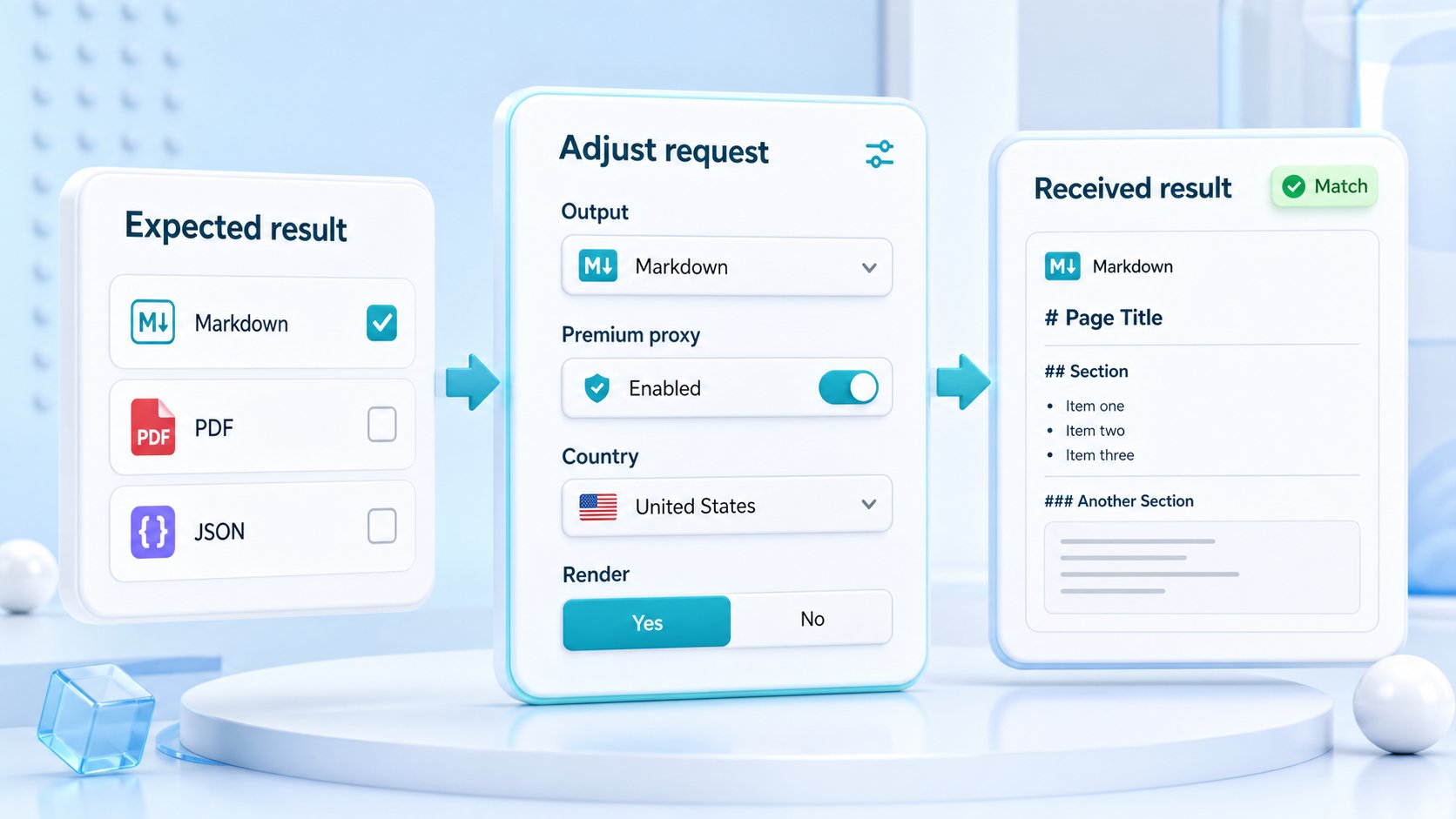
Expected result compared with received result while output format, premium proxy, country, and rendering settings are adjusted

02 / Expected vs received

Adjust the request until the received output matches the expected result

Switch between HTML, clean text, Markdown, PDF, JSON, or screenshot output and inspect what comes back. If the response is incomplete, tune rendering, premium proxy, country, headers, sessions, waits, or retries until the sample produces the data artifact your workflow needs.

  • Does the content type match the workflow?
  • Are required fields present and readable?
  • Does country or premium proxy change the result?
  • Does rendering produce missing page content?
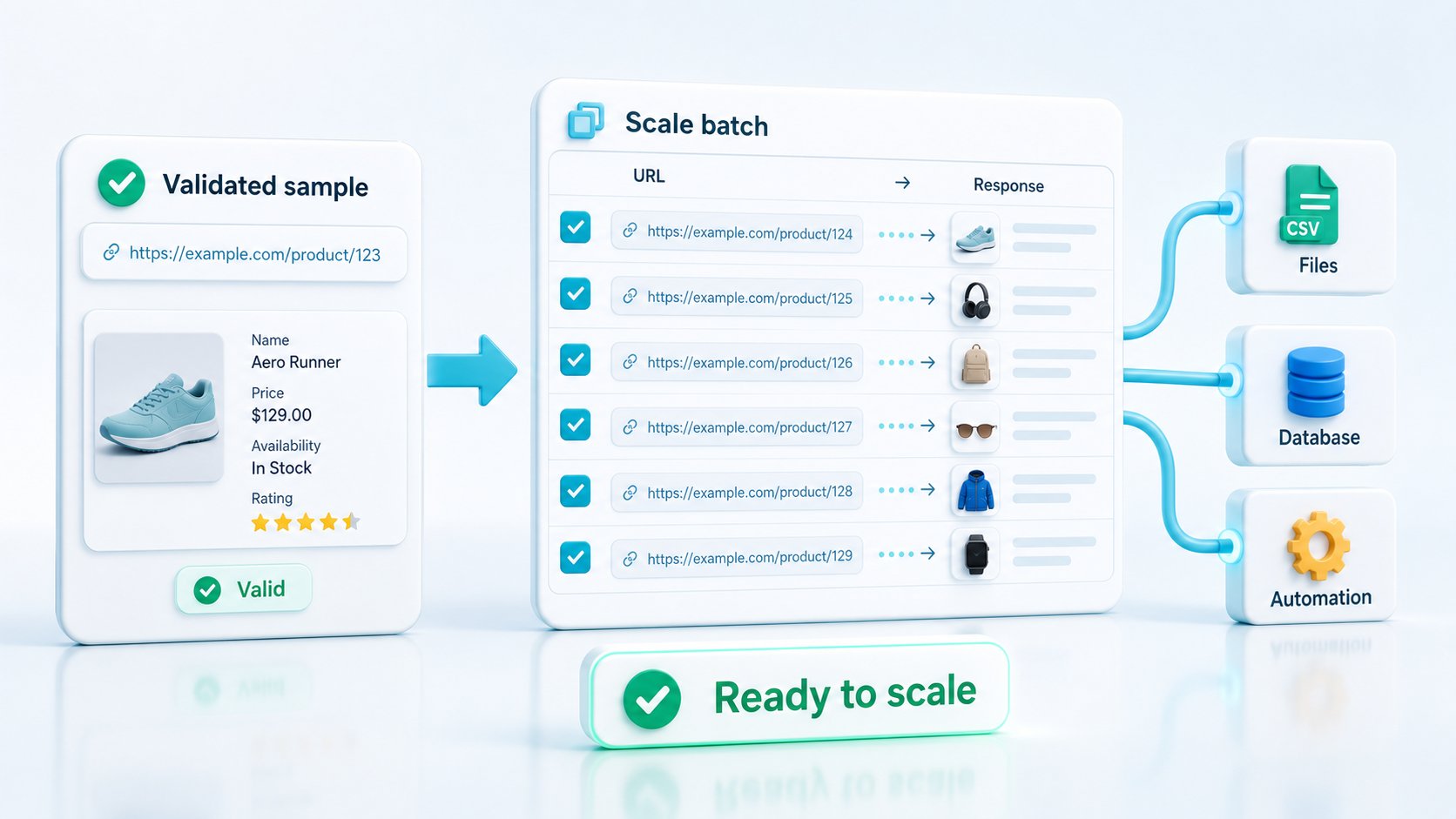
A validated sample request scaling into files, database records, and automation outputs

03 / Scale only after proof

Turn the validated sample into a repeatable extraction profile

Once one URL returns the right artifact, reuse the same request settings for the larger URL set. That keeps batch jobs tied to a known-good profile instead of discovering format, routing, or rendering mistakes after thousands of requests.

Batch exportsDatabase recordsAutomationsQA evidence

Local listing request builder

Build repeatable local listing requests with source evidence and clean output

Use HTML for custom extraction, text or Markdown for readable listing review, metadata for enrichment and debugging, and screenshots when visible listing state or proof matters.

LOC
Listings

Capture public business records with source context

Name, category, address, website, rating, hours, source URL, final URL, and timestamp make records easier to review, dedupe, and enrich.

nameaddresshours
CITY
Markets

Test city, category, and pagination behavior

Local sources often change by region, query, sort order, visible result page, and listing template. Validate those patterns before scaling.

citycategory
QA
Proof

Keep screenshots for sensitive records

Visual proof helps review high-value listings, changed hours, disputed profile states, and local QA samples.

screenshotproof

Controls that shape local business scraping

url

The public directory, listing, profile, city, category, or search result page being captured.

format

The output shape for enrichment, review, dedupe, monitoring, or proof.

render

Browser execution when listing fields are client-side.

wait

Timing control for late-loading map panels, profile sections, or result cards.

country

Regional routing when local results vary by market or language.

download

File output when screenshot or PDF proof is useful.

cURL example

Generate Markdown with the same request shape you can move into production

curl "https://scraperfly.com/api/v1?url=https%3A%2F%2Fexample.com&format=markdown" \
  -H "apikey: YOUR_API_KEY"

Listing recovery

Turn local listing failures into request decisions

A missing field might mean the listing changed, the source redirected, the page requires rendering, or the output format is wrong. Treat the response as evidence before changing the pipeline.

Developer reviewing code and API request parameters on a laptop

01 / Request setup and access

Fix request mistakes first

Some failures are not target problems at all. They happen before ScraperFly can make a meaningful delivery attempt: a missing or malformed URL, an unsupported output format, an incompatible visual file type, a missing API key, an invalid key, or a key that has been paused or disabled. These errors are configuration signals, not retry signals: stop the workflow, point the developer to the exact field that needs correction, and keep credits focused on real target tests instead of repeated bad inputs.

missing_urlinvalid_urlunsupported_formatinvalid_api_key
  • Validate the URL and encoding before sending a batch.
  • Use supported outputs: HTML, text, Markdown, JSON, screenshot, or PDF.
  • Match screenshot file types to image output and PDF file type to PDF output.
  • Treat missing or invalid API keys as configuration work, not retry work.
Business dashboard with charts, documents and usage planning on a desk

02 / Credits, limits and concurrency

Separate limits from failures

A workload can fail because the account has no usable credits, the monthly plan limit has been reached, or concurrency is too aggressive for the current plan and target mix. ScraperFly makes those limits visible as operating signals, not mysterious scrape failures. That keeps the buying decision practical: start free, test the target, buy pay-as-you-go credits for uneven jobs, move to monthly credits when volume becomes predictable, and use backoff when request pressure is the real issue.

usage_limit_reachedrate_limitedcreditsbackoff
  • Use account status to check remaining credits before large runs.
  • Retry rate limits with backoff instead of immediately increasing pressure.
  • Keep one-off projects on pay-as-you-go when volume is uneven.
  • Move predictable recurring work to monthly credits when the pattern is proven.
Server room representing delivery paths, routing and network infrastructure

03 / Target delivery and network

Find delivery failures first

Many scraping platforms collapse delivery issues into a vague request failure. In production, that is not enough. The team needs to know whether the request timed out, the upstream target returned a temporary server error, the connection failed, the response was too large, redirects went somewhere unexpected, or the page came back as tiny HTML with no useful content. ScraperFly turns those failures into delivery evidence: try the light profile first, compare status and response size, then decide whether the next request needs backoff, another route, premium proxy, country targeting, or a narrower capture.

timeout5xxredirectsresponse_too_large
  • Retry temporary network and upstream failures with a controlled backoff policy.
  • Compare final URL, status, content type and response size across samples.
  • Escalate routing only when the response proves the simple path is unstable.
  • Treat oversized responses as a scope problem before scaling the same profile.
Digital security screen representing anti-bot and protected access signals

04 / Anti-bot, geo and access blocks

Read blocks before escalation

A target 403, 401, 429, CAPTCHA screen, WAF challenge, login wall, consent loop, or region-specific mismatch is not just an error; it is a clue about what the site expects from the visitor. Competitors often push teams toward a heavier default profile, but that can burn budget without proving the fix. ScraperFly's better path is evidence-based escalation: preserve realistic headers when context matters, use sessions when continuity changes the response, enable rendering when the useful content is browser-built, and choose premium or country routing when reputation or geography changes the result.

403429CAPTCHAcountry mismatch
  • Use premium routing when IP reputation is the proven bottleneck.
  • Use country targeting when language, currency, inventory or search results change by market.
  • Use headers, cookies and sessions when visitor state changes the response.
  • Reduce concurrency and add backoff when repeated requests trigger target throttling.
Developer preparing code and output artifacts on a laptop

05 / Rendering and output quality

Ship usable artifacts

A 200 status is not the same thing as a usable scrape. The raw HTML can be an empty app shell, Markdown can miss the main article, JSON can lack expected metadata, text can include noise, screenshots can be blank, and PDF or image output can fail if the browser step times out. ScraperFly is valuable because the same API request can move from raw HTML to rendered DOM, clean text, Markdown, JSON, screenshot or PDF, then be checked against the artifact your product actually needs. That reduces glue code, failed imports, and expensive batch runs that only discover bad output after the fact.

render_timeoutbrowser_render_failedJSON fieldsPDF/image output
  • Enable rendering when raw HTML is only a shell and the useful content appears after JavaScript.
  • Validate text, Markdown and JSON against expected fields before batching.
  • Use screenshot or PDF output when visual proof or audit evidence matters.
  • Treat blank or partial artifacts as quality failures even when HTTP status is successful.

Local data cost

Keep local listing capture predictable as cities and categories expand

Local business workflows can multiply quickly across markets, categories, and pagination. Keep simple sources on lightweight HTML, text, or Markdown, and reserve rendering, waits, screenshots, country routing, sessions, and premium delivery for source samples that prove they improve record quality.

01

Page volume

City, category, pagination, and profile combinations can grow quickly once a source is proven.

02

Rendering needs

Map widgets, result cards, hours, and filters may require browser execution on some sources.

03

Regional context

Country, language, and routing choices matter when public local results vary by market.

04

Proof capture

Screenshots and PDFs are useful for QA samples and high-value records, not every listing.

What makes local business scraping heavier

More infrastructure work

Browser rendering, routing choices, and longer waits mean the platform has to do more than return a simple response.

More target uncertainty

Redirects, empty states, rate limits, and challenge pages often require stronger delivery options or retries.

More state to preserve

Cookies, sessions, consent, and multi-page flows add moving parts that a plain stateless fetch does not have.

More evidence to return

Screenshots, PDFs, rendered output, and richer response artifacts are useful, but they are heavier than plain HTML.

How ScraperFly keeps local capture practical

Sample before scale

Test a small URL set first and group targets by the lightest profile that returns complete data.

Do not render by default

Inspect raw HTML before turning on rendering. Many public pages already contain the data you need.

Escalate by evidence

Move up only when the response shows missing content, state dependency, geo variance, or routing problems.

Measure useful results

Optimize around valid records delivered, not raw request volume. A lighter profile is best only when it stays complete.

Local data FAQ

Common questions about local business data scraping workflows

Practical answers for teams capturing public business listings while keeping source URLs, field quality, timestamps, rendering decisions, and proof records explicit.

Local data FAQ

Public listing pages

Clarify what gets captured and what downstream systems must verify.

What is web scraping for local business data?

It is the capture of public local business source pages such as directories, business profiles, category pages, location pages, and regional listings so downstream systems can review, enrich, dedupe, monitor, or validate records.

Does ScraperFly verify phone numbers, emails, or business ownership?

ScraperFly captures public source pages and response evidence. Verification, enrichment, deduplication, ownership checks, and CRM modeling belong in the downstream system that uses the captured data.

Record quality

Capture consistent fields before enrichment and dedupe.

Which local business fields are useful to capture?

Useful fields often include business name, category, address, city, region, phone, website, profile URL, opening hours, rating, review count, description, source URL, final URL, timestamp, and visual proof for important records.

How can teams reduce duplicate or low-quality local records?

Collect consistent source fields, preserve timestamps, keep source URLs, compare city and category context, and pass confidence notes downstream. ScraperFly captures the page evidence; dedupe rules should live in the data model.

Rendering and regions

Use heavier controls when source samples prove they matter.

When does local business scraping need rendering?

Use rendering when listings, map panels, hours, pagination, or profile sections appear only after client-side JavaScript runs. Start with source HTML and compare rendered output before making browser execution the default.

How should local business scraping handle city and category pages?

Test representative city, category, sort, and pagination URLs before scaling. Preserve the source URL, final URL, timestamp, output format, and request controls so records can be traced back to the public page state.

Screenshots and cost

Keep visual proof and request weight tied to record value.

Are screenshots useful for local business data workflows?

Screenshots are useful for high-value records, changed opening hours, disputed listing states, local profile review, and QA samples. Machine-only enrichment usually works better with HTML, text, Markdown, and metadata.

How can local listing capture stay affordable?

Keep simple directory pages on lightweight HTML, text, or Markdown. Add rendering, waits, screenshots, country routing, sessions, or premium delivery only when source samples prove those controls improve record quality.