Public social evidence
Capture public social pages without pretending to own the platform layer
Social scraping is valuable when teams need visible public evidence: profile pages, brand pages, post pages, public mentions, campaign pages, community updates, or page states that need review and archiving. It becomes risky and unhelpful when the capture layer pretends to provide private access, follower enrichment, sentiment scoring, or a complete social dataset.
ScraperFly keeps the boundary clear. It captures public pages in useful formats, exposes response context, supports rendering when the visible content needs browser execution, and lets your own system decide what to parse, classify, compare, report, or ignore.

What is a social media scraping API?
A social media scraping API is a hosted request layer for capturing public social web pages and returning the result to your application. The page might be a public profile, a public brand page, a post page, a hashtag or mention page, a campaign landing page, or another visible social surface that your team is allowed to review.
The important word is capture. ScraperFly does not replace your product's policy checks, data model, enrichment rules, reporting logic, or classification layer. It gives developers a controlled way to fetch a public page, inspect what came back, choose a response format, and preserve evidence before downstream systems transform that page into something useful.
That makes the workflow more honest and more useful. Instead of promising a magic social dataset, the page capture layer answers a practical engineering question: can we reliably retrieve the public page state our product needs to parse, compare, summarize, monitor, or archive?
Which public social pages are worth capturing?
Social workflows often mix several page types. A public profile can show identity, bio, links, recent posts, and visible metadata. A post page may carry the canonical content, media, timestamps, comments preview, share context, or a public engagement state. Brand and campaign pages may matter for monitoring, competitive research, compliance review, or content QA.
The capture strategy should follow the job. A monitoring workflow needs stable timestamps, final URLs, response status, and repeatable samples. A review workflow may need clean text or Markdown. A compliance or QA workflow may need screenshots or PDFs that preserve how a public page appeared at a point in time.
| Public page type | Signals to inspect | Useful output | Downstream use |
|---|---|---|---|
| Profile or brand page | Bio text, public links, visible posts, page sections, metadata | HTML, Markdown, screenshot | Review source state and feed custom parsers |
| Post page | Caption, media context, timestamp, public page layout, canonical URL | HTML, text, screenshot, PDF | Archive evidence or compare public content changes |
| Mention or topic page | Visible cards, pagination, filters, public snippets, source links | Rendered HTML, JSON metadata | Build scoped monitoring samples |
| Campaign page | Message, creative state, landing context, screenshots, dates | Markdown, screenshot, PDF | Support marketing QA and audit review |
| Dynamic social surface | Client-rendered cards, lazy media, consent states, empty shells | Rendered HTML and screenshot | Decide whether browser execution changes the evidence |
Teams get better results when they define the visible public signals before scaling. If the workflow only needs readable content, heavy visual output may be unnecessary. If the workflow needs proof of page appearance, a screenshot can be more valuable than another parser field.
When should teams use browser rendering for social pages?
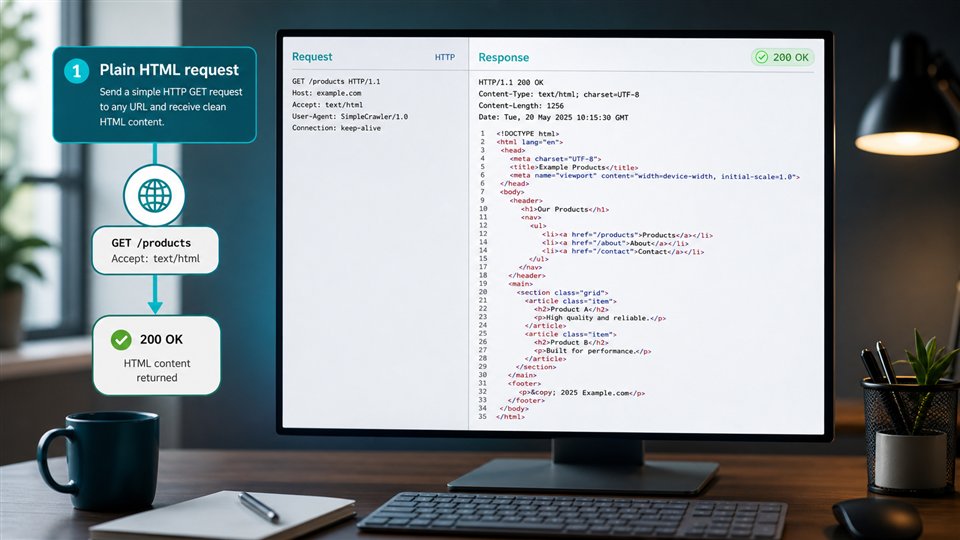
Many public social pages are JavaScript-heavy, but that does not mean every request should start with a browser. The better first step is to compare the source response with the rendered state. If raw HTML already contains the content your parser needs, a simple request is faster, easier to debug, and usually more affordable.
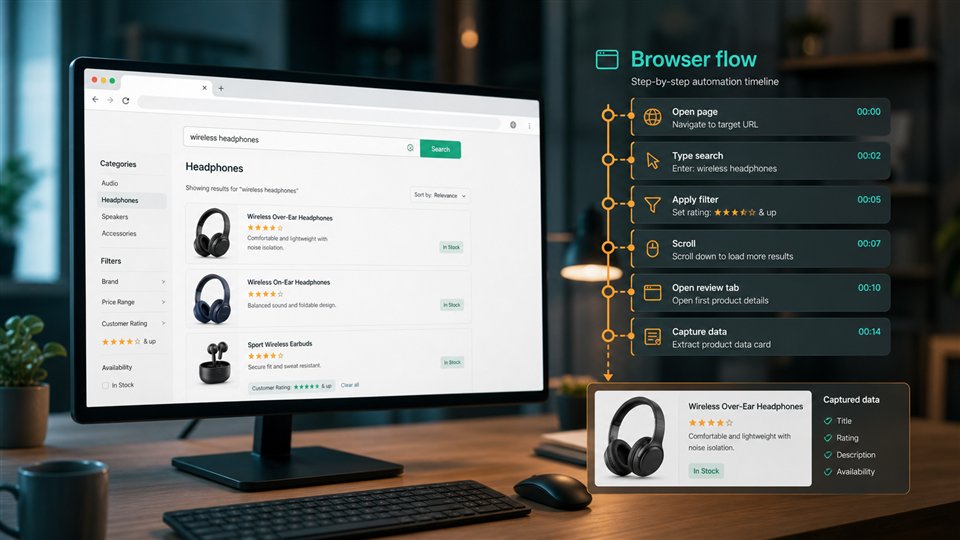
Enable JavaScript rendering when browser execution changes the captured result: visible posts appear only after client-side code runs, media cards are lazy-loaded, consent or region state changes the response, or the screenshot must show the same public page state a reviewer would see in a browser.
Rendering should be treated as a precise capture option. It is there when public content needs browser execution, not as a default tax on every social URL. This keeps experiments small and gives production workflows a clearer reason for each heavier request profile.
Which response format fits social page capture?
Format choice affects the quality of the downstream workflow. HTML preserves structure for custom parsers. Text and Markdown are easier for review, search, summarization, and internal knowledge workflows. JSON metadata helps teams log status, final URL, content type, timing, and request context. Screenshots and PDFs preserve visual proof when content presentation matters.
For AI and editorial review, Markdown can be easier to inspect than raw markup. For monitoring, HTML plus metadata may be more useful because the system can compare DOM structure, canonical URLs, status codes, and response size. For compliance or campaign QA, screenshots or PDFs create a reviewable artifact that text alone cannot replace.
The safest pattern is to test a few representative public URLs in the API Builder, compare formats, and choose the smallest output that the product can use immediately. The response formats page is useful when the team needs a broader format decision framework.
How can social scraping stay responsible and predictable?
Responsible social scraping starts with scope. Stay on public pages, respect target rules, avoid private account claims, and keep the capture layer separate from sensitive enrichment or user profiling. ScraperFly gives teams request controls and output formats; it does not decide whether a source should be used, how content should be classified, or what business action should follow.
Predictability also matters. Social pages can become expensive if every request uses rendering, screenshots, PDFs, premium routing, sessions, and broad pagination by default. Start with a small set of representative public pages, inspect failures, and add heavier controls only when response evidence shows they improve the capture.
| Decision point | Good default | When to add more |
|---|---|---|
| Access scope | Public pages and visible evidence only | Review permissions and target rules before expanding source coverage |
| Rendering | Start with source HTML | Enable when content is browser-built or visual state matters |
| Output format | Choose the smallest useful response | Add screenshots or PDFs for review, archive, or page appearance proof |
| Delivery controls | Keep the first profile light | Add waits, headers, sessions, country routing, or stronger delivery when evidence supports it |
| Cost model | Use free credits and pay-as-you-go for uneven testing | Move recurring monitoring to monthly credits when volume is predictable |
That staged approach is exactly where ScraperFly is strongest. Teams can start free, test the real target, keep one-off experiments flexible, and use pricing that maps request weight to enabled controls instead of forcing every social workflow into a subscription before it has proven value.